1
Your Lead Data
Protect historical leads, call recordings, messages, attachments, contact information, and performance reports.
Free LSA Migration Checklist
Google is moving Local Services Ads into Google Ads. Download this complete checklist to protect your historical data, document your current setup, and verify everything transfers correctly.
Enter your info below for immediate access.
Protect Your LSA Campaign
The checklist shows you what to preserve and what to inspect so problems don't quietly cost you leads.
Protect historical leads, call recordings, messages, attachments, contact information, and performance reports.
Verify your services, service areas, schedule, phone number, photos, business information, and campaign status.
Prepare for the move from weekly to daily budgets and the removal of manual bidding in favor of Target CPA.
Before and After Migration
This is more than a quick list of reminders. It covers the campaign details, historical metrics, lead records, and post-migration checks that roofing companies and agencies need to review.
How Your LSA Campaign Will Migrate
Use this map to document your current profile and confirm each setting after Google completes the migration.
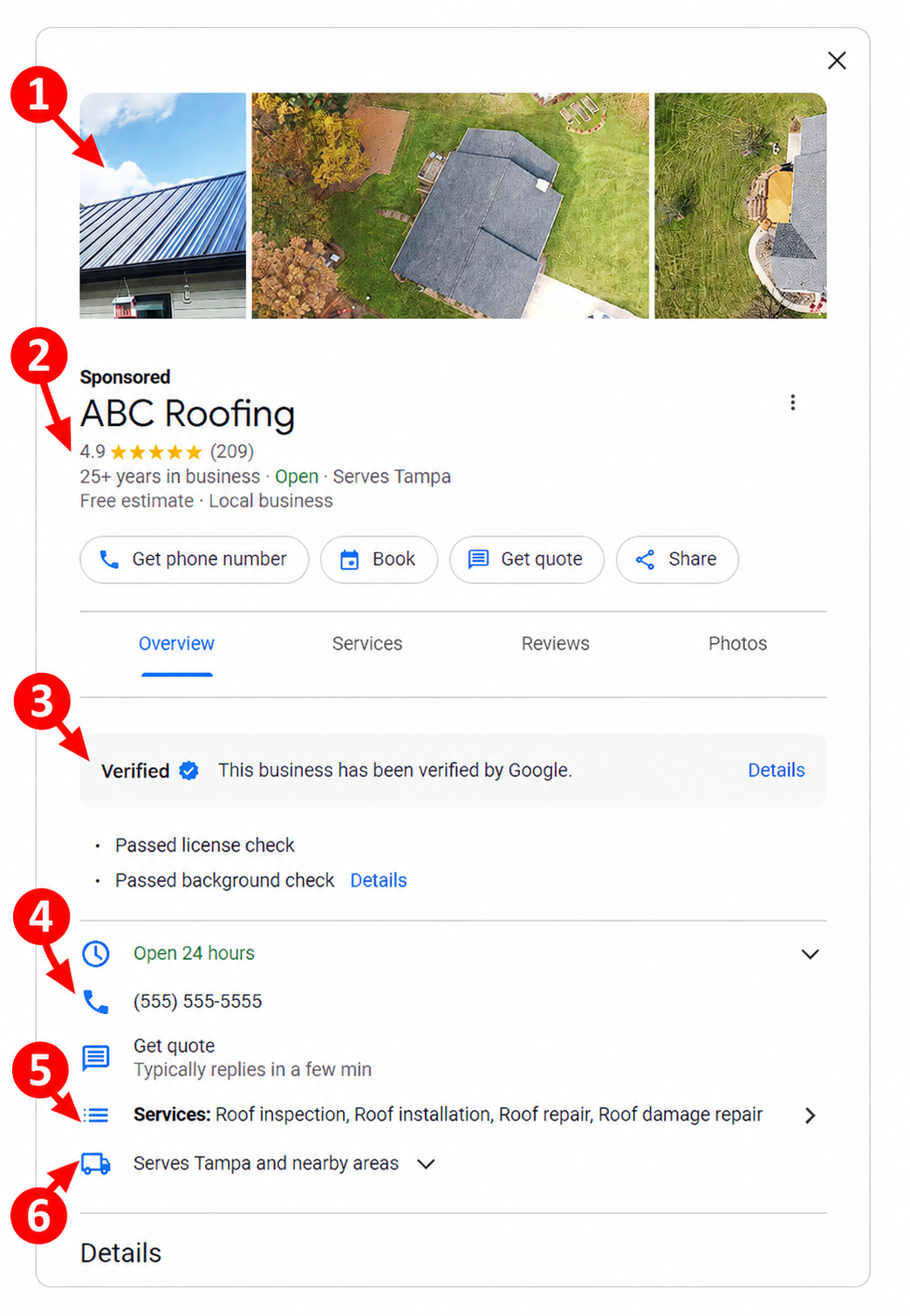
Photos transfer automatically. Review and manage them under Google Ads → Assets, where you can add up to 100 additional photos.
Your name, address, and standard hours remain controlled by your Google Business Profile and sync into Google Ads. Your rating and reviews remain connected to the profile.
Your completed verification and Google Verified badge should transfer automatically. Confirm the badge still appears after migration.
Find and manage leads under Google Ads → Goals → Conversions → Leads. Phone routing can be updated directly in Google Ads.
Review these under Google Ads → Campaigns → Settings. Confirm every individual service transferred—not just the main category.
These move to Google Ads → Campaigns → Settings and can be managed independently from your Google Business Profile.
Be Ready Before Google Migrates Your Account
Download the complete checklist now so you have an exact guide on what to save before migration and what to verify after the change.
Download the Free ChecklistLSA Migration FAQs
Google says targeted locations, service types, business categories, budget limits, ad schedules, business photos, verification status, and historical customer leads will transfer automatically. You should still verify every item after ads migration.
Your previous Google Local Service Ads performance reports will not transfer. Save your historical impressions, spend, charged leads, cost per lead, and other benchmarks before your LSA transfer date.
Yes. Google says past customer contact details, message history, and older call recordings will move to the new Leads page under Google Ads → Goals → Conversions → Leads.
Yes. After LSA accounts migrate, campaigns will continue using a pay-per-lead model and will continue appearing in the existing local placements on Google Search and Google Maps.
Manage your business name, physical address, and standard hours through your Google Business Profile. Manage service areas, ad schedules, categories, budgets, bidding, assets, campaign status, and account health through Google Ads.
Your weekly budget will be divided by seven to create a daily average budget. Manual maximum cost-per-lead bidding will no longer be supported, and Google will use a campaign-level Target CPA.
The account administrator should receive an email approximately 14 days before migration, followed by another reminder seven days later. A notice should also appear inside your existing Google LSA account.
Why We Built This
We developed this checklist because the migration process is uncertain and information is limited. Sean Gallagher, our founder and lead marketer, developed our checklist. Sean has over 28 years of digital marketing experience and has helped thousands of business owners grow their companies. He is an expert at LSA, helping roofers who have never received a lead from LSA to roofers running multi-location listings. He used this expertise to develop a comprehensive LSA migration program for roofing companies in addition to providing roofer marketing. He also develops technology services (its applications include lead tracking, automation, and marketing analytics) specifically for roofing companies. He's been recognized as a leader in digital marketing and LSA by leading publications, such as The Guardian and StartupNation. His innovative solutions have also earned him a Google Partnership and several partnerships with industry software providers. If you're interested in our services, contact us using the form on our website. After the submission process, we'll reach out to discuss your marketing goals..